Our intrusion detection system has alerted us to suspicious behavior on a workstation, pointing to a likely malware intrusion. A memory dump of this system has been taken for analysis. Your task is to analyze this dump, trace the malware’s actions, and report key findings.
Author: @CyberDefender
Q1: What is the name of the process responsible for the suspicious activity?
Yêu cầu: Xác định process chịu trách nhiệm cho hoạt động đáng ngờ trên workstation.
Đầu tiên, sử dụng Volatility 3 để kiểm tra danh sách process tồn tại trong memory dump.
Có thể sử dụng plugin:
1 | python3 vol.py -f memory.dmp windows.pslist |
hoặc:
1 | python3 vol.py -f memory.dmp windows.pstree |
Trong danh sách process xuất hiện một executable đáng chú ý:
1 | ChromeSetup.exe |
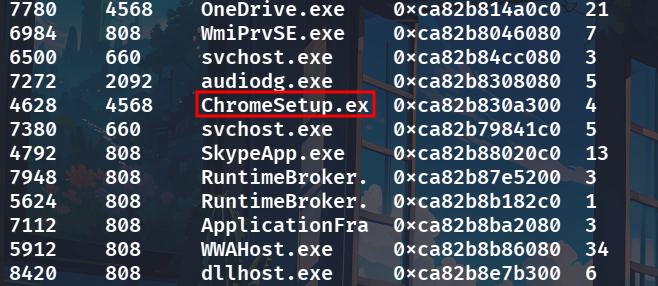
Process này có PID:
1 | 4628 |
Tên ChromeSetup.exe có vẻ giống bộ cài Google Chrome, tuy nhiên chỉ dựa vào tên file chưa thể kết luận đây là chương trình hợp lệ. Vì vậy cần tiếp tục kiểm tra vị trí thực thi và network connection của process.
ChromeSetup.exe
Q2: What is the exact path of the executable for the malicious process?
Yêu cầu: Xác định đường dẫn đầy đủ của executable ChromeSetup.exe.
Sau khi xác định được process đáng ngờ, sử dụng plugin cmdline để kiểm tra command line của process:
1 | python3 vol.py -f memory.dmp windows.cmdline |
Sau đó tìm PID hoặc tên process:
1 | ChromeSetup.exe |
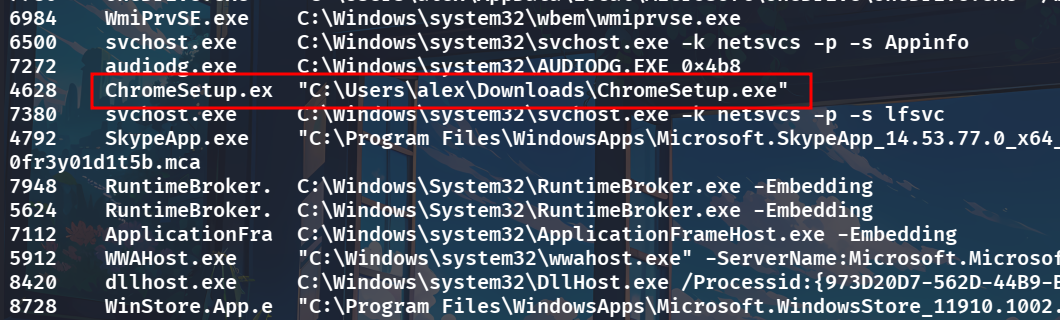
Kết quả cho thấy process được thực thi từ:
1 | C:\Users\alex\Downloads\ChromeSetup.exe |
Việc executable nằm trực tiếp trong thư mục Downloads thay vì vị trí cài đặt thông thường là một dấu hiệu cần tiếp tục điều tra.
Kết hợp với network activity ở câu tiếp theo, process này được xác định là nguồn của hoạt động độc hại.
C:\Users\alex\Downloads\ChromeSetup.exe
Q3: Identifying network connections is crucial for understanding the malware’s communication strategy. What IP address did the malware attempt to connect to?
Yêu cầu: Xác định địa chỉ IP mà ChromeSetup.exe cố gắng kết nối tới.
Để kiểm tra network connection còn tồn tại trong memory dump, sử dụng plugin:
1 | python3 vol.py -f memory.dmp windows.netscan |
Sau đó tìm các connection liên quan đến PID:
1 | 4628 |
và process:
1 | ChromeSetup.exe |

Kết quả cho thấy process ChromeSetup.exe tạo connection từ máy nạn nhân:
1 | 192.168.19.133 |
tới remote endpoint:
1 | 58.64.204.181:5202 |
Trong kết quả còn xuất hiện trạng thái:
1 | SYN_SENT |
cho thấy process đã cố gắng khởi tạo TCP connection tới remote host này
58.64.204.181
Q4: To determine the specific geographical origin of the attack, Which city is associated with the IP address the malware communicated with?
Yêu cầu: Xác định thành phố được geolocation database liên kết với địa chỉ IP 58.64.204.181.
Sau khi tìm được remote IP ở câu trước, tiến hành tra cứu thông tin IP bằng whois.
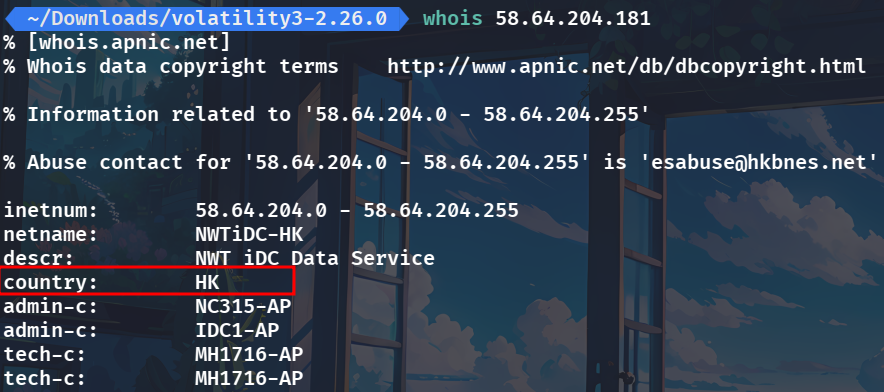 Từ chữ viết tắt mình có thể biết được đây chính là Hong Kong
Hong Kong
Q5: Hashes serve as unique identifiers for files, assisting in the detection of similar threats across different machines. What is the SHA1 hash of the malware executable?
Yêu cầu: Trích xuất executable ChromeSetup.exe từ memory dump và tính SHA1 hash của mẫu.
Trước tiên cần dump file của process PID 4628.
Có thể sử dụng plugin windows.dumpfiles:
1 | python3 vol.py -f ~/Downloads/ranmit/memory.dmp -o ~/Documents windows.dumpfiles --pid 4628 |
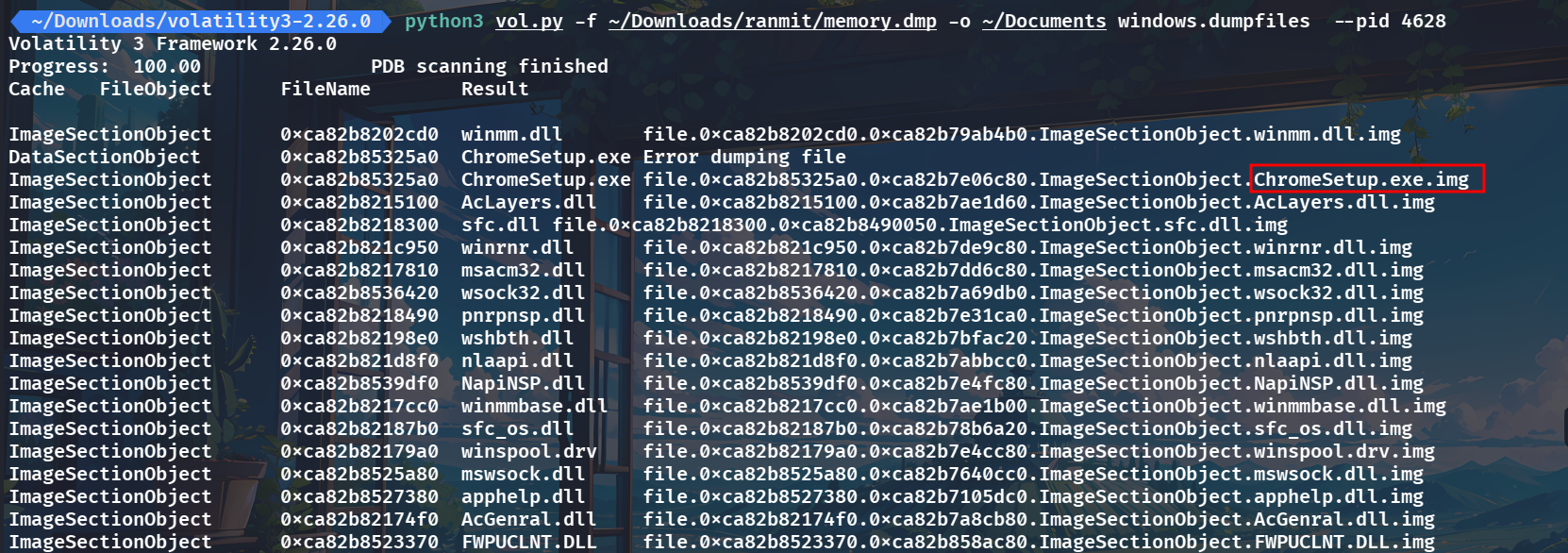
Volatility tìm được ChromeSetup.exe trong memory và tạo ra file dump có tên dạng:
1 | file.0xca82b85325a0.0xca82b7e06c80.ImageSectionObject.ChromeSetup.exe.img |
Sau khi có file, sử dụng sha1sum:

280c9d36039f9432433893dee6126d72b9112ad2
Q6: Examining the malware’s development timeline can provide insights into its deployment. What is the compilation timestamp for the malware?
Yêu cầu: Xác định compilation timestamp của mẫu malware.
Sau khi đã có SHA1 của ChromeSetup.exe, sử dụng hash để tra cứu mẫu trên VirusTotal.
Chuyển sang:
1 | Details → History |
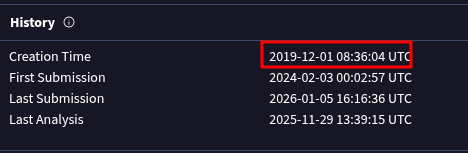
Tại trường Creation Time, VirusTotal hiển thị:
1 | 2019-12-01 08:36:04 UTC |
2019-12-01 08:36
Q7: Identifying the domains associated with this malware is crucial for blocking future malicious communications and detecting any ongoing interactions with those domains within our network. Can you provide the domain connected to the malware?
Yêu cầu: Xác định domain có liên quan đến network activity của malware.
Tiếp tục sử dụng mẫu đã tra cứu trên VirusTotal và chuyển sang tab:
1 | Relations |
Trong phần:
1 | Contacted Domains |
có thể quan sát các domain mà mẫu đã liên lạc trong quá trình phân tích.
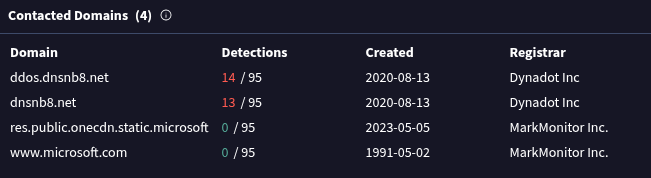
Hai domain đáng chú ý là:
1 | ddos.dnsnb8.net |
Trong khi các domain còn lại như:
1 | www.microsoft.com |
thuộc infrastructure hợp lệ của Microsoft.
dnsnb8.net
ATTACK CHAIN
